PowerUp Card Program
A streamlined, recharge-first card program built for speed. Cards aren't linked to the wallet — instead, you recharge the card directly with the amount you want available to spend. Spend limits are set during card creation and can be adjusted later via the Update Card API — there's no separate spend limit endpoint. PINs are configured during card assignment.
Best for: Fast card issuance with straightforward prepaid recharge functionality.
Flow: Cardholder → KYC → Wallet → Create Card / Assign Card → Activate Card (For Physical) → Recharge Card → Ready to Use
Authentication
Authenticate your API requests using a bearer access token. Obtain the token using your email, company code, and API key via the Obtain Access Token API, then include it in the Authorization header on subsequent requests.
💡 The access token is valid for 30 minutes.
Program Workflow: Cardholder Lifecycle
New to PowerUp Card Program? Start here — this walks through the full cardholder lifecycle, from onboarding and KYC through wallet creation, card issuance, and recharge.
This section describes the end-to-end workflow for onboarding a cardholder, completing KYC, creating a wallet, and issuing cards.
Cardholder Onboarding and KYC
The onboarding process begins with cardholder registration and identity verification.
Workflow Diagram
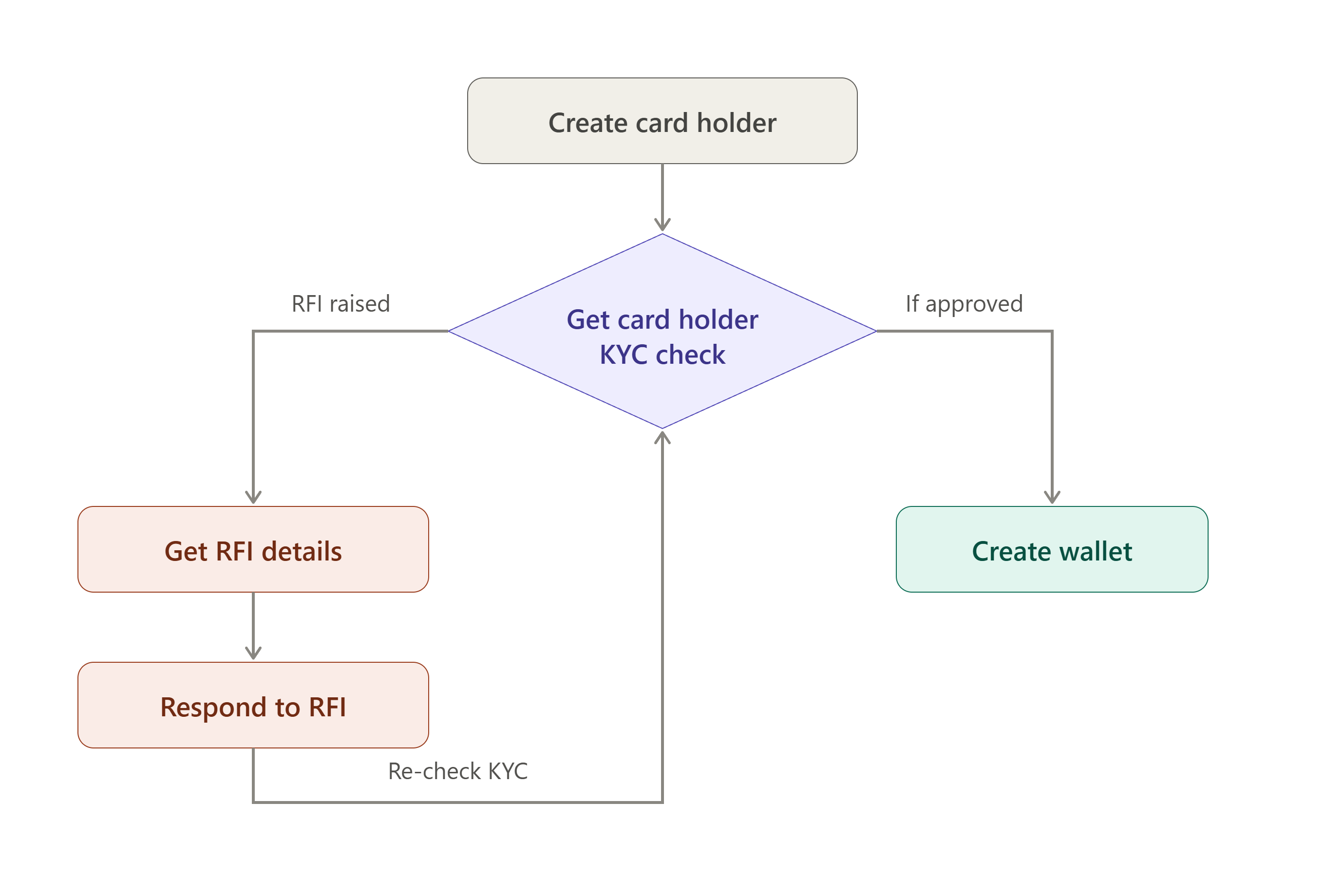
Create Cardholder:
The workflow begins when a card holder is created in the system. Basic identity and contact information is captured at this stage, including the details required for downstream KYC verification.
Get Cardholder KYC check:
The captured details are run through a KYC check to verify the card holder's identity.
Possible outcomes:
- Approved – The cardholder proceeds directly to wallet creation.
- RFI (Request for Information) – Additional information or supporting documents are required before approval can be granted.
RFI Handling (If Applicable):
- Get RFI details — the system surfaces the specific information or documentation the KYC provider requires.
- Respond to RFI — the card holder (or an internal user on their behalf) submits the requested information. Once submitted, the response is routed back into the "Get Cardholder KYC check" step, where it is re-evaluated. This loop repeats until the KYC check returns an approved outcome.
💡 Only an approved KYC check allows the workflow to continue to wallet creation.
Wallet and Card Creation
After successful KYC verification, a wallet is created for the cardholder.
Workflow Diagram
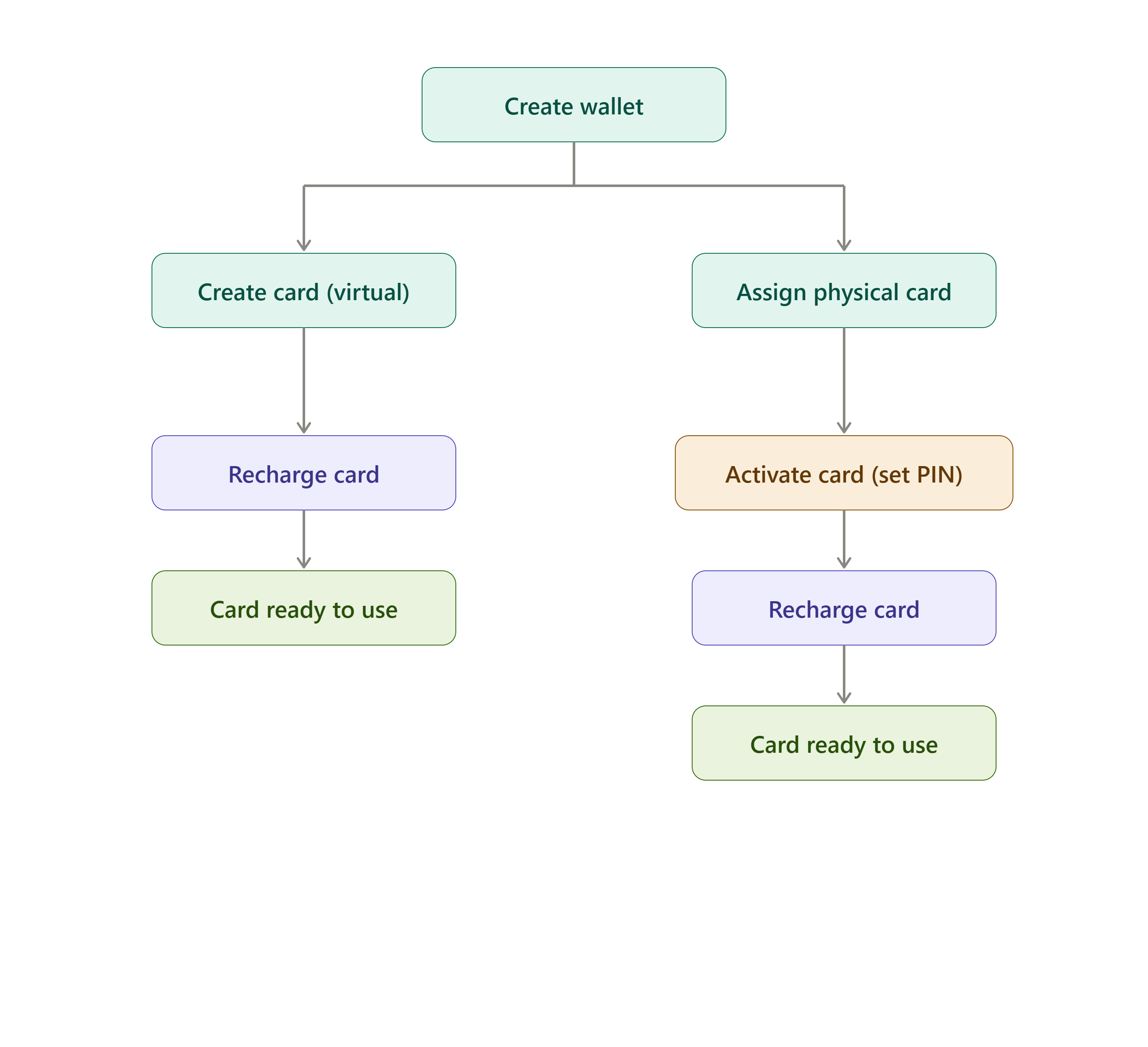
Create Wallet:
Once KYC is approved, a wallet is created for the card holder. From the wallet, card creation and assignment become available.
Create Card / Assign Card:
Unlike wallet-linked programs, PowerUp cards are issued with their own spend limit to be defined at creation:
- Create Card (Virtual) — a virtual card is created with an initial spend limit configured directly during creation.
- Assign Card (Physical) — a physical card is assigned to the cardholder, with a PIN set as part of the assignment step.
Spend limits can be adjusted later via the Update Card API — there's no separate Spend Limit endpoint in this program.
Activate Card (Physical Cards Only):
Physical cards require activation via the Activate Card API before they can be recharged or used. Virtual cards are activated automatically upon creation and do not require this step.
Recharge Card:
Once a card is created (and activated, for physical cards), it must be recharged before it can be used for spending. Recharging tops up the card balance directly — cards are not linked to the wallet, so this is the only way to fund a PowerUp card.
Card Ready for Use: A card becomes available for transactions once:
- Card creation or assignment is completed.
- Activation is completed (physical cards only).
- The card has been recharged with a spendable balance.
Get Started with PowerUp Card Program APIs
Follow these essential steps to start integrating:
- Authentication Section – Obtain a bearer access token to authenticate your API requests.
- Cardholder Section – Set up a new cardholder in the system.
- KYC Section – Manage cardholder verification, RFI requests, and responses.
- Wallet Section – Create a wallet for your cardholder, and retrieve wallet transaction history.
- Card Section – Issue a card with a spend limit to be configured at creation.
- Recharge Card Section – Top up card balance directly for spending.
- Transaction Section – Retrieve the card transaction list.
Need real-time event notifications for this program? Check out the shared Webhook API →